

SmartKit AI for WordPress
SmartKit AI is a WordPress plugin that embeds advanced AI-driven text and image generation tools directly into your website’s dashboard. No more jumping between external AI apps and your site – SmartKit AI brings content creation and brainstorming right into WordPress. Create high-quality blog posts, product descriptions, SEO meta tags, and even stunning images with just a few clicks. All AI content is generated in context, using your prompts and preferences, and inserted exactly where you need it.
Generate Text and Images with Your Favorite AI Model

OpenAI
Create natural, high-quality content for posts and products (titles, descriptions, excerpts, SEO meta), generate images, and auto-fill Media fields like Alt Text, Caption, and Description.

Gemini
Generate fast, well-structured content (summaries, FAQs, rewrites, page sections), create images, and automatically fill Media fields like Alt Text, Caption, and Description.
Let AI Power Up Your WordPress Content and Images
AI Text
Generate titles, descriptions, posts, and product copy. Works directly inside your WordPress editor.
AI Images
Create images from prompts in seconds. Perfect for posts, pages, and products.
Media Fields
Auto-fill Alt Text, Caption, and Description. Keep your Media Library clean and SEO-ready.
SEO Meta
Generate SEO titles and meta descriptions. Improve CTR with better snippets.
Bulk Jobs
Run generation for many items at once. Save time on large websites.
Logs
See what was generated and when. Review outputs and repeat workflows.
Personal
1 Site, billed yearly- 1 Website Activation
- Content Writer
- Image Generator
- 1-Click Media Fields
- SEO Meta Generator
- Bulk Jobs
- Logs and History
- Premium Support
Business
5 Sites, billed yearly- 5 Websites Activation
- Content Writer
- Image Generator
- 1-Click Media Fields
- SEO Meta Generator
- Bulk Jobs
- Logs and History
- Premium Support
Personal
1 Site, Lifetime- 1 Website Activation
- Content Writer
- Image Generator
- 1-Click Media Fields
- SEO Meta Generator
- Bulk Jobs
- Logs and History
- Premium Support
Business
5 Sites, Lifetime- 5 Websites Activation
- Content Writer
- Image Generator
- 1-Click Media Fields
- SEO Meta Generator
- Bulk Jobs
- Logs and History
- Premium Support
SmartKit AI Features for Faster WordPress Content and Images
Designed for bloggers, marketers, e-commerce store owners, and developers alike, SmartKit AI offers an intuitive interface to craft prompts, manage results, and fine-tune outputs. From a central AI Dashboard providing at-a-glance usage stats to deep integration with the Gutenberg editor, every feature is built to streamline your workflow. It supports both OpenAI and Google AI as content engines – just plug in your API keys and choose your model. Under the hood, SmartKit AI connects directly to these providers (no third-party servers), giving you full control over your data and costs. And best of all, no coding is required – all these powerful features are accessible through a user-friendly WordPress interface.
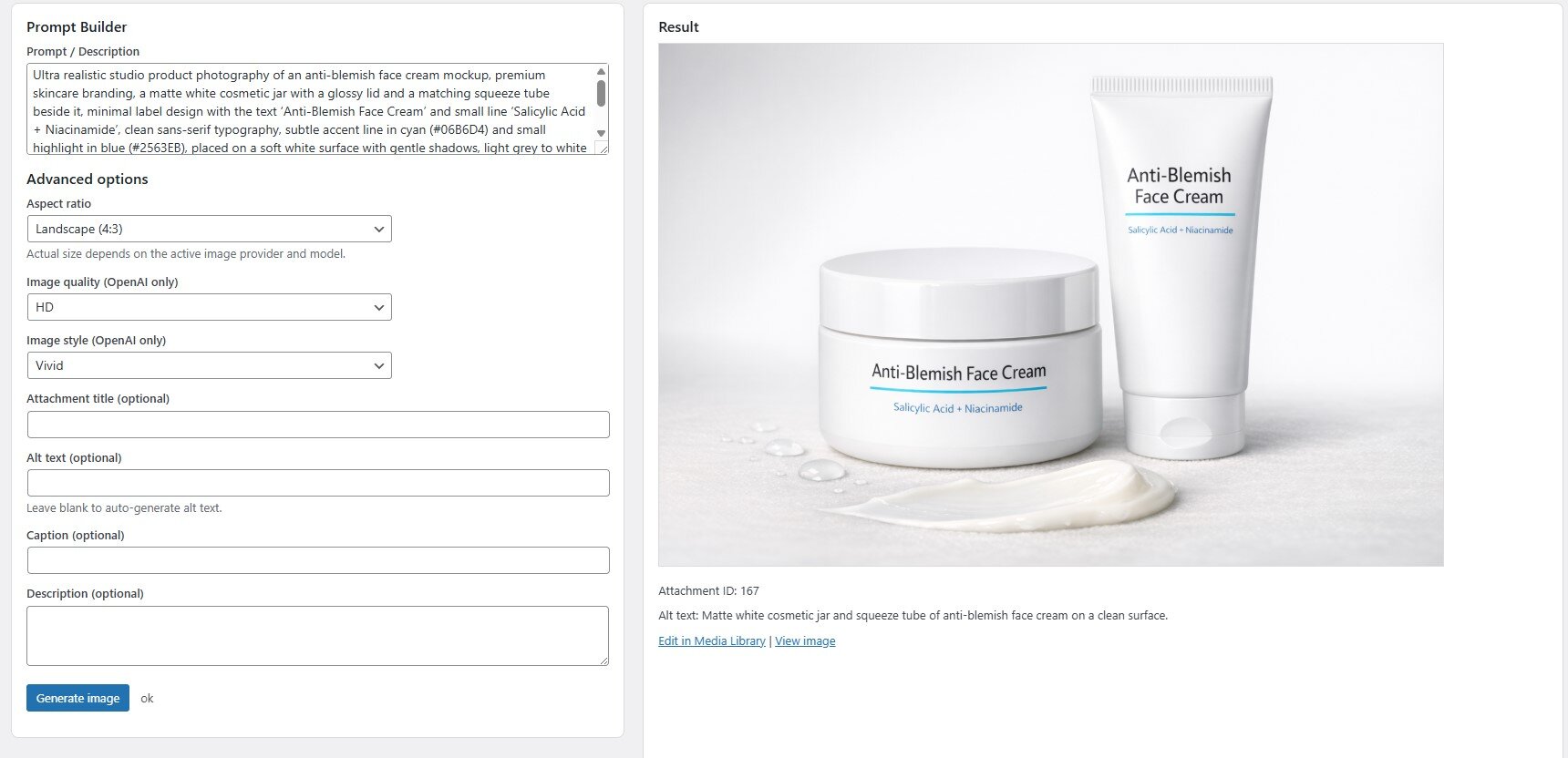
AI-Powered Image Generation
Create Images with AI: Generate unique images from text prompts directly within WordPress. Use AI to produce feature images, illustrations, or visuals and save them straight to your Media Library. No external tools needed.
Featured Images Automation
Set AI-generated images as featured images for your posts/products with a click. Easily add eye-catching visuals to your content.
Automatic Image SEO
For any image you generate (or even existing ones), let SmartKit AI write the alt text, caption, and description. Improve your SEO and accessibility by automating image metadata creation.
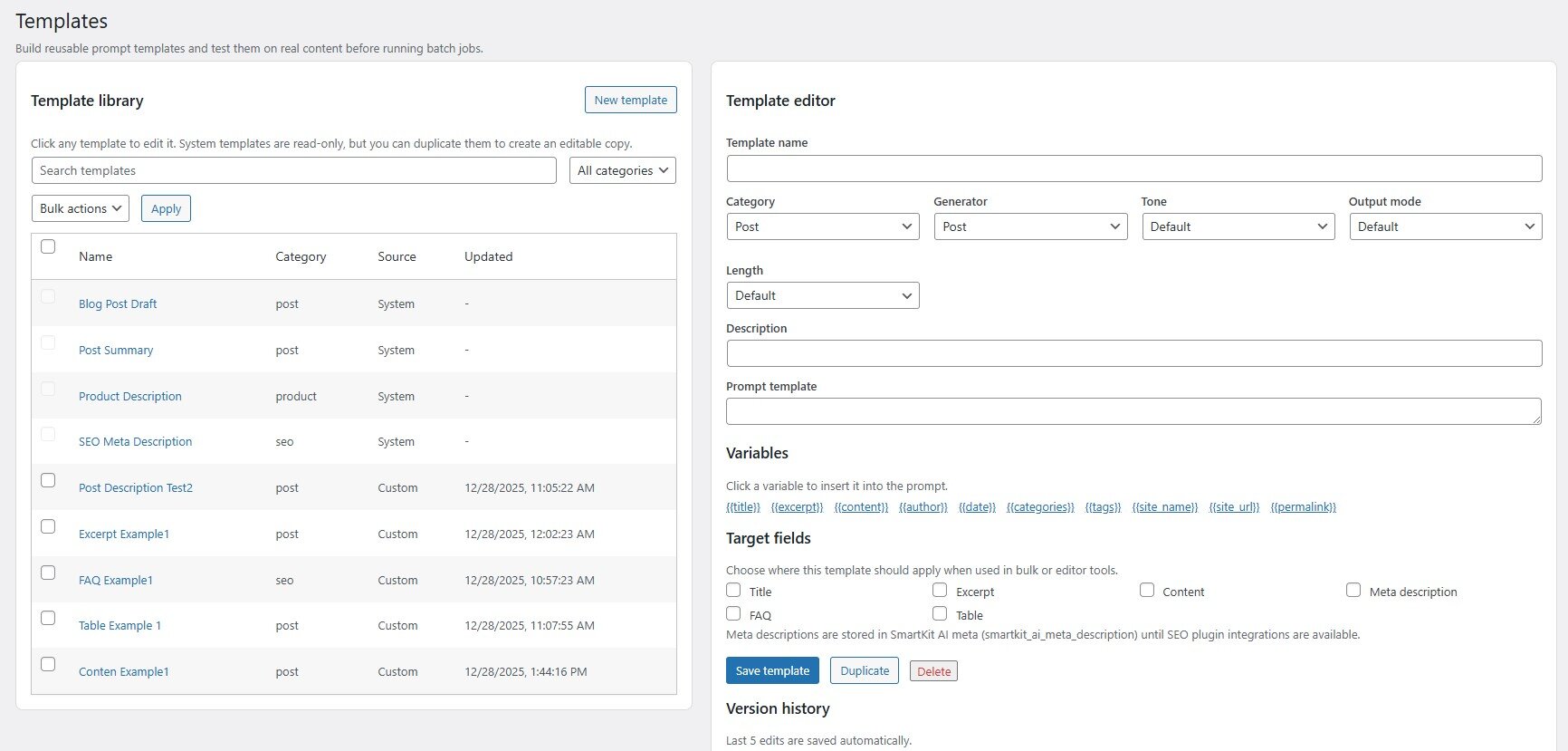
Smart Prompt Templates
- Reusable Templates: Save your frequently used prompts as templates for consistency and speed. You can include dynamic variables (like post title, author, date, keywords, etc.) in templates – making it easy to tailor AI outputs to each post or product without rewriting prompts.
- Customizable Outputs: Each template can define the desired tone (e.g. friendly, formal), target audience, writing style, length, and even output format. Generate a list, a paragraph, an FAQ section, or a table – you decide the structure of the AI’s response.
- Organized Library: Manage templates in a dedicated library with categories and version history. Clone and modify templates, test them with sample prompts, and revert to previous versions if needed. SmartKit AI keeps the last 5 versions of each custom template for you.
Batch Jobs & Automation
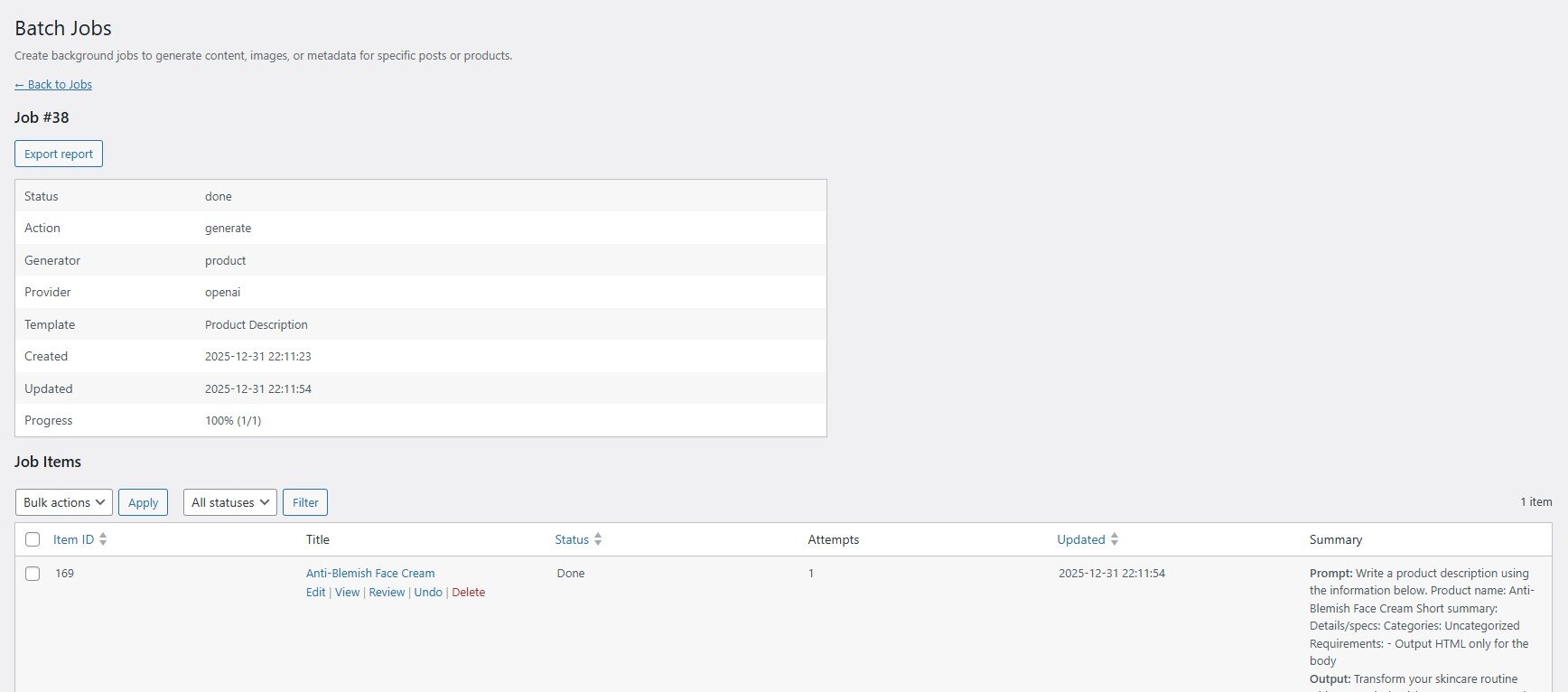
- Bulk Content Generation: Need to update or create lots of content at once? SmartKit AI’s Batch Jobs let you queue up AI tasks for multiple posts, pages, or products in one go. For example, generate product descriptions for an entire catalog or SEO meta for all your posts with a single job.
- Queue & Schedule: Batch jobs run in the background using WordPress’s cron system – no need to keep your browser open. Monitor the queue from the Dashboard: you can pause, resume, or reorder jobs at any time. The system will retry tasks on transient errors automatically.
- Review Before Publish: Every generated output can be held for review. Inspect AI-generated content in a safe preview mode before applying it live. You have full control to accept, edit, or discard each piece.
- One-Click Undo & Export: If you applied a batch of AI changes and want to revert, the plugin stores snapshots so you can undo changes individually or in bulk. Plus, export detailed CSV reports of each batch job – including outputs, usage stats, and costs – for auditing or offline review.
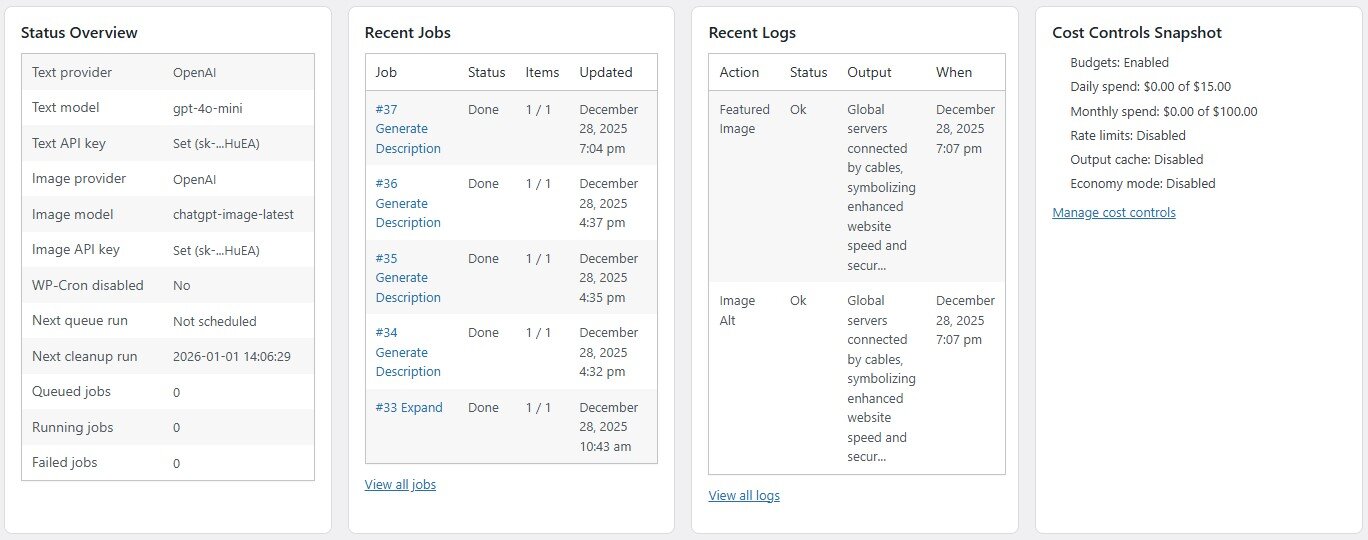
Cost Controls & Budgeting
Daily/Monthly Budgets
Set usage budgets to keep AI API costs in check. For example, limit the
whole site to $10 of AI usage per day, or set different monthly budgets per user role (e.g. editors vs.
contributors). SmartKit AI will enforce these limits and stop generating once a budget is reached.
Rate Limiting
Prevent overuse or abuse by setting per-user caps (e.g. max 100 generations per day
or 5 per hour for a user). This is great for multi-author sites – ensure fairness and avoid sudden
spikes in usage.
Smart Caching
Don’t pay twice for the same result. SmartKit AI caches the output of identical text
prompts for a configurable time. If a prompt has been run before, you can instantly reuse the
cached result instead of calling the API again – saving you time and money.
Economy Mode
Stretch your budget when needed. Enabling Economy Mode will automatically use
cost-saving settings (like shorter completions, lower image resolution, or reduced tokens) for
generation requests. You get more results with less API cost – ideal for non-critical tasks or when
nearing budget limits.
Logging & Privacy
Detailed Logs
Every AI request and response is logged for you to review. See which user prompted
what, which AI model was used, the token usage, cost estimation, and a snippet of the generated
output – all from an in-plugin log page. Filter logs by date, user, content type, or status to quickly find
specific entries.
Privacy Controls
Decide how much information to log. For sensitive content, you can mask or
redact parts of prompts and outputs in the log, or disable logging of content entirely. SmartKit AI
gives you control to balance accountability with privacy.
Diagnostics & Support
A built-in Help & Diagnostics section helps test your API connections and
ensure everything is configured correctly. If you run into issues, generate a one-click system report
for support. SmartKit AI is developed by CodeMaster Hub with clean code and WordPress standards,
ensuring reliability and security (all data stays on your site).
Seamless WordPress Integration
Native Admin Pages
SmartKit AI looks and feels like a natural part of WordPress. It adds its own
menu section with an AI Dashboard and pages for Generate, Templates, Batch Jobs, Logs, Settings,
etc. The Dashboard gives quick insights (provider status, queue status, recent jobs, usage stats) so
you’re always informed.
Gutenberg & Classic Editor Friendly
Use AI where you write content. In Gutenberg, SmartKit adds
a sidebar panel and toolbar buttons for block-level AI actions – so you can generate or improve
content without switching screens. Generate headlines, fix grammar, or even create images for a
block right from the editor. In the Classic Editor, simply use the SmartKit AI meta box to prompt the
AI.
Extensible & Developer-Friendly
Built with modular architecture and plenty of hooks/filters,
developers can customize SmartKit AI’s behavior or integrate other plugins easily. For example, use
provided REST API endpoints to trigger AI generation or manage templates from external
applications. The plugin respects WordPress capability systems, so you can control which user roles
get access to AI features.
Optimized & Clean
SmartKit AI is optimized for performance – it only runs processes when needed
and offloads heavy tasks to background jobs. It also includes a cleanup tool: set how long to keep
logs and generated content history, and if you ever uninstall, it can remove all its data for a clean
slate. Light footprint, huge functionality.
Media Library Tools
A special SmartKit AI interface in the Media Library allows one-off image
generation and editing. You can generate new images from scratch or enhance existing ones. When
viewing any image attachment, SmartKit provides buttons to auto-generate alt text, captions, or
descriptions using AI, making media management smarter.

Technical Details
- Requires WordPress: 6.2 or higher (compatible with the latest WordPress versions)
- Requires PHP: 7.4 or higher (fully PHP 8.x compatible)
- Supported Editors: Works with both Gutenberg Block Editor and Classic Editor
- AI Providers: OpenAI (GPT-3.5/4, DALL·E) and Google AI (Gemini models) – API keys required (bring
your own keys; usage fees are as per your provider plan) - Languages & Localization: English interface by default. Translation-ready with a .pot file included
for easy localization. - Included Documentation: Yes – full documentation is provided (HTML and PDF). Plus, an online
documentation portal for up-to-date guidance. - Support & Updates: Purchase includes 6 months of support from CodeMaster Hub (with option to
extend). Regular updates will add new features and improvements – your purchase includes lifetime
free updates. - License: GPLv2 or later (open-source friendly licensing)
Get Started with SmartKit AI
Ready to revolutionize your WordPress content creation workflow? SmartKit AI gives you the power of
OpenAI and Google’s cutting-edge AI models, all within an intuitive WordPress plugin. Save countless hours
drafting content and managing images, while maintaining full control over quality and costs. Whether
you’re a content creator, a developer, or an agency, SmartKit AI adapts to your needs and scales with you.
Get SmartKit AI today and experience the future of content and image generation in WordPress!
You must log in and be a buyer of this download to submit a review.